Hard-coded secrets are one of the easiest ways for sensitive credentials to accidentally enter a software repository.
A developer adds an API key while testing a feature. Someone commits a database password to a configuration file. A CI/CD token ends up in a pipeline definition. A Kubernetes secret is stored in a manifest and pushed to Git.
The code works. The pull request gets merged. The application is deployed.
And somewhere along the way, a credential that should never have been exposed is now sitting inside the software supply chain.
This is where secret detection becomes an important part of application security.
Why Secret Detection Matters
Modern applications depend on many types of credentials:
- API keys
- Passwords
- Database credentials
- Cloud access keys
- OAuth and OIDC tokens
- Encryption keys
- JWT signing secrets
- CI/CD tokens
- Kubernetes credentials
- Container registry credentials
- Infrastructure automation credentials
A leaked secret can have consequences far beyond the repository where it was committed.
For example, a compromised cloud credential might provide access to storage, databases, compute resources, or identity systems. A leaked database password could expose application data. A JWT signing secret could potentially allow attackers to forge authentication tokens.
The earlier we detect these credentials, the easier they are to remove and rotate.
Ideally, the secret should be detected before it reaches production.
Aren't Existing Secret-Scanning Tools Enough?
There are already excellent tools for detecting secrets, including GitLab Secret Detection, TruffleHog, Gitleaks, GitGuardian, and Semgrep.
These tools provide valuable built-in detection capabilities. However, organizations often have something that generic rules cannot fully understand: their own development conventions.
Different teams may use different variable names, abbreviations, configuration structures, or even different languages.
For example, developers might use names such as:
Password, pass, passwd, pwd, api_key, apikey, token, secret, client_secret, db_password
An organization may also use localized or non-English terminology.
This means that relying only on global signatures may leave gaps.
A better approach is to combine standard detection with custom rules designed around the way your organization actually writes and stores sensitive values.
Custom Secret Detection with Semgrep
Semgrep allows us to define custom rules for detecting organization-specific secret patterns. Once the rules are defined, we can run the scanner against the source code using the custom ruleset.
For example:
semgrep scan --config ./secrets.yaml ./project.py
In this example, secrets.yaml contains the custom detection rules, while project.py is the source file being scanned. This makes it possible to test and refine secret-detection rules locally before integrating them into the CI/CD pipeline.
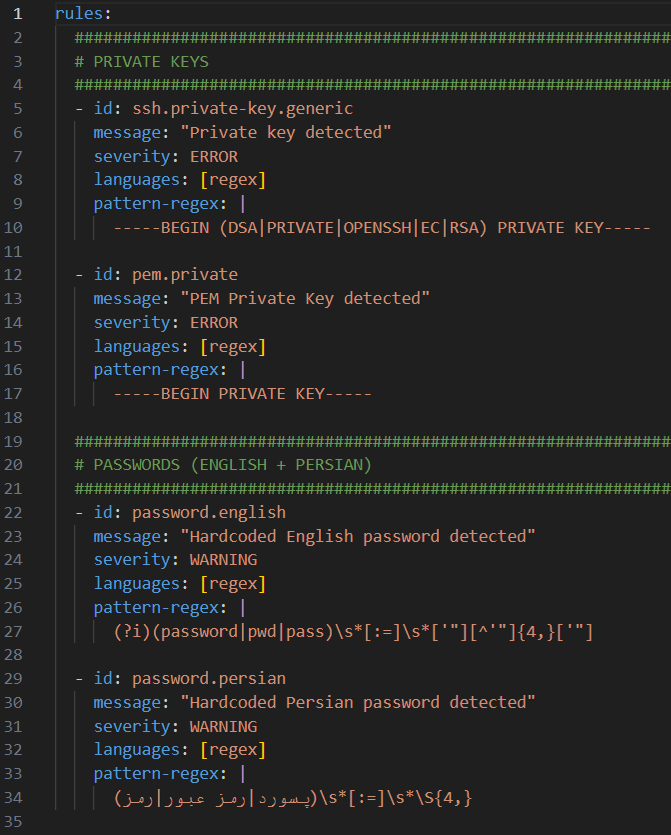
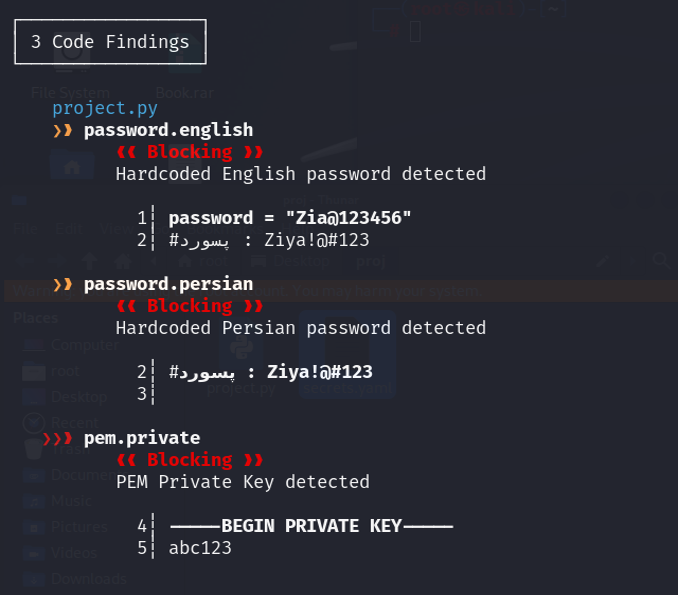
Semgrep can be used as part of the CI/CD security process.
In a GitLab environment, the built-in Semgrep analyzer can use GitLab's default ruleset. Custom rules can also be explicitly supplied so that organization-specific patterns are scanned alongside the default rules.
For example:
semgrep scan \
  --config auto \
  --config .gitlab/semgrep/custom-rules/SecretRuleSet.yaml
The important idea is simple:
Default rules + Custom organization rules = Broader secret detection
Custom rules allow security teams to detect patterns that are specific to their own applications, infrastructure, and naming conventions.
What Should We Detect?
Secret detection should not focus on one particular credential type.
A useful ruleset should cover several categories.
1. Encryption and Cryptographic Secrets
Encryption keys are particularly sensitive because they directly control the protection of data.
Examples include:
- AES keys
- RSA private keys
- EC private keys
- JWT signing secrets
- HMAC secrets
- Encryption keys
- Decryption keys
A ruleset might recognize names such as:
- aes_key
- rsa_key
- jwt_secret
- jwt_key
- signing_key
- signing_secret
- hmac_secret
- hmac_key
If a private key or encryption secret is exposed, an attacker may be able to decrypt protected information, forge signatures, or impersonate trusted services.
Therefore, cryptographic secrets deserve a high-priority detection strategy.
2. OAuth and OpenID Connect
Modern authentication systems frequently depend on OAuth 2.0 and OpenID Connect.
Potentially sensitive values include:
- OAuth client secrets
- Access tokens
- Refresh tokens
- OIDC client secrets
- Signing keys
Example patterns include:
- oauth_secret
- oauth_token
- oauth_client_secret
- oauth_client_id
- oidc_client_secret
- oidc_client_id
- refresh_token
- access_token
Not every identifier is itself a secret. For example, a client ID can be public in some architectures.
This is an important lesson for secret detection:
A good detector needs context, not just keywords.
A rule that flags every occurrence of client_id may create unnecessary false positives. Detection becomes more useful when the rule considers the surrounding structure and the value assigned to the variable.
3. Database Credentials
Database credentials are another common source of accidental exposure.
Applications may connect to:
- MySQL
- PostgreSQL
- SQL Server
- MongoDB
- Redis
- Other data stores
Common variable names include:
- mysql_password
- mysql_user
- mysql_pass
- postgres_password
- postgres_user
- pg_pass
- db_password
- db_user
- db_pass
Credentials can also appear inside connection strings.
They may be found in:
- .env files
- Docker Compose files
- application configuration
- Kubernetes manifests
- Helm charts
- Terraform configuration
- CI/CD variables
The impact can be significant because databases often contain application accounts, personal information, tokens, logs, and other sensitive data.
4. Cloud Provider Credentials
Cloud credentials deserve particular attention because they can provide access to infrastructure rather than a single application component.
Examples include credentials associated with:
- AWS
- Google Cloud
- Microsoft Azure
Potential patterns include:
- aws_secret
- aws_access_key
- gcp_key
- google_credentials
- azure_key
- azure_secret
- cloud_secret
A compromised cloud credential could potentially provide access to storage, compute resources, databases, identity systems, or deployment infrastructure, depending on its permissions.
Cloud credentials may appear in Terraform variables, Kubernetes configuration, CI/CD variables, Docker build arguments, or local development scripts.
This is why secret detection should extend beyond application source code.
5. DevOps and CI/CD Secrets
The CI/CD pipeline is another high-value area.
Build and deployment systems frequently have credentials that allow them to access:
- source repositories
- cloud infrastructure
- container registries
- deployment environments
- artifacts
- production systems
Examples include:
- ci_token
- cd_token
- pipeline_secret
- runner_token
- gitlab_token
- github_token
- github_key
- cicd_secret
A leaked CI/CD credential can potentially affect the software delivery process itself.
Instead of compromising one application, an attacker may be able to manipulate builds, access artifacts, or deploy unauthorized workloads.
This makes the CI/CD pipeline an important part of the secret-detection boundary.
6. Kubernetes, Docker, Helm, Terraform, and Ansible
Infrastructure-as-code and cloud-native environments introduce another large surface for accidental secret exposure.
Secrets can appear in:
- Kubernetes manifests
- kubeconfig files
- Helm values
- Dockerfiles
- Docker Compose files
- Terraform variables
- Terraform state
- Ansible playbooks
- CI/CD deployment scripts
Example patterns include:
- kube_token
- kubernetes_token
- docker_password
- docker_token
- helm_secret
- terraform_secret
- ansible_vault_password
- ansible_vault_key
Terraform state deserves particular attention because state can contain sensitive infrastructure information and credentials.
The broader lesson is that secret scanning should cover infrastructure repositories as well as application repositories.
7. Base64-Encoded Secrets
One common misconception is that Base64 provides security.
It does not.
Base64 is an encoding mechanism, not encryption.
Sensitive values may be Base64-encoded in:
- Kubernetes manifests
- Helm configuration
- Terraform files
- CI/CD variables
- Docker configuration
- environment files
For example, a developer might encode a credential and assume that the encoded value is safe to commit.
But Base64 is reversible.
Therefore, a secret detector should consider encoded values where appropriate rather than assuming that a value is safe simply because it is not immediately readable.
Building a Custom Ruleset
A basic custom ruleset can begin with generic secret-related keywords:
- secret
- key
- api_key
- apikey
- access_key
- private_key
- client_secret
- auth_token
- session_token
- refresh_token
- bearer
- token
- credential
- password
- passwd
- pwd
It can then be expanded with organization-specific terminology and categories such as:
# Encryption
- aes_key
- rsa_key
- jwt_secret
- hmac_secret
# OAuth / OIDC
- oauth_client_secret
- oidc_client_secret
- refresh_token
# Database
- mysql_password
- postgres_password
- db_password
# Cloud
- aws_secret
- gcp_key
- azure_secret
# CI/CD
- pipeline_secret
- runner_token
- gitlab_token
# Kubernetes / Infrastructure
- kube_token
- docker_password
- terraform_secret
- ansible_vault_password
The exact patterns should be adapted to the organization's codebase.
Don't Ignore False Positives
There is an important trade-off in secret detection:
More aggressive detection gives greater coverage, but it can also produce more false positives.
For example:
key: value
does not necessarily contain a secret.
Likewise:
password_label = "Enter your password"
does not contain a credential.
A useful detection rule should therefore avoid treating every occurrence of a keyword as a confirmed secret.
One approach is to look for a combination of:
- A secret-related variable name
- An assignment
- A suspicious-looking value
Conceptually:
secret-related-name + assignment + suspicious-value
This provides a better signal than simply searching for the word secret.
The goal is not to create the noisiest scanner.
The goal is to create a scanner that developers will actually trust and use.
Run Secret Detection in CI/CD
Secret scanning is most valuable when it happens automatically.
A practical pipeline can look like this:
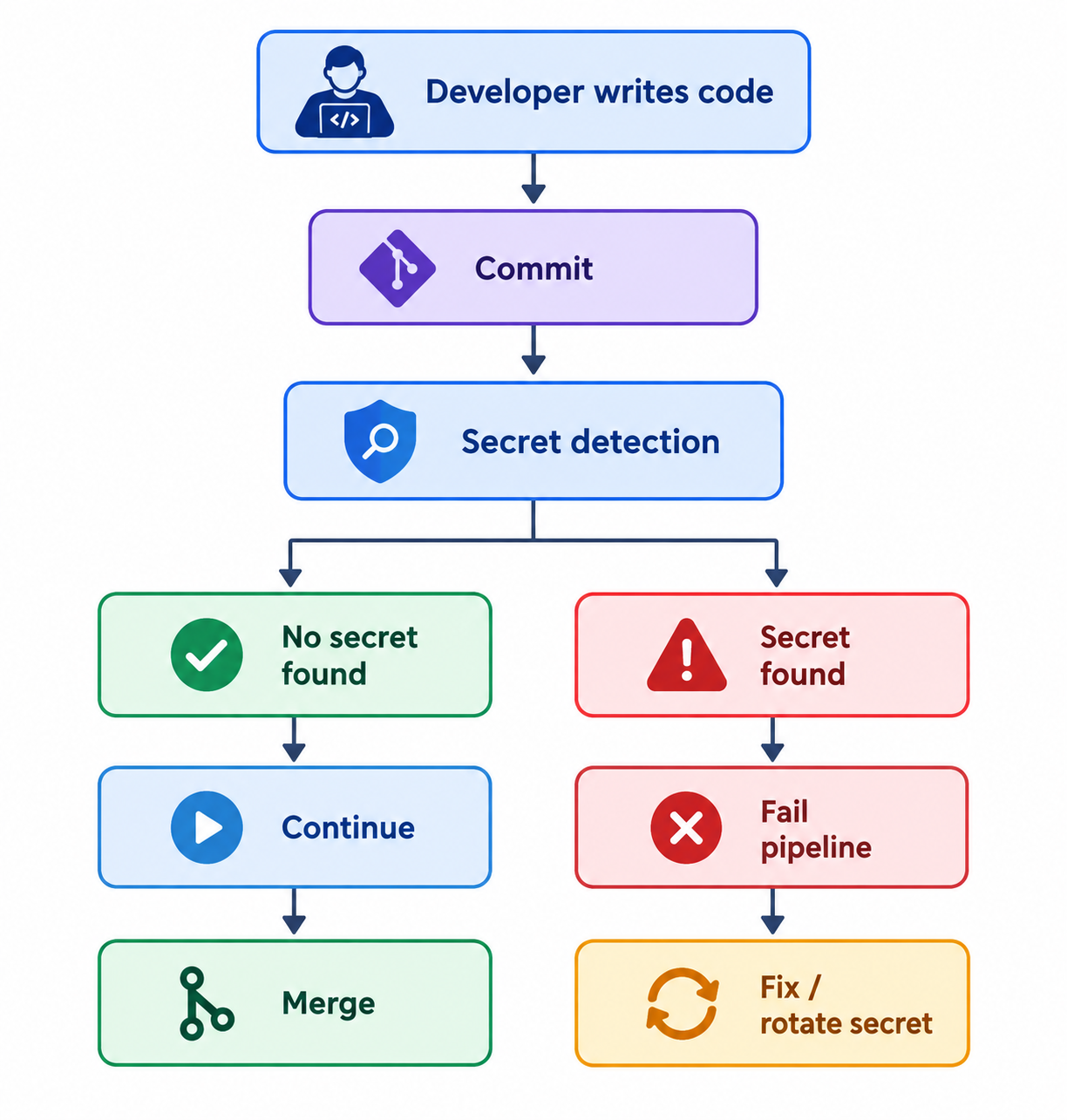
Every commit or merge request can trigger the scan.
If a secret is detected, the pipeline should stop and provide immediate feedback.
This creates a security control directly inside the developer workflow rather than relying on someone to discover the secret later.
Detection Is Only the First Step
Finding a secret is not the same as fixing the incident.
If a real credential has already been committed and exposed, simply deleting the line from the latest version of the file may not be enough.
The credential may still exist in:
- Git history
- CI/CD logs
- build artifacts
- container images
- caches
- backups
- other repositories
A leaked credential should therefore be treated as potentially compromised.
The appropriate response can include:
- Revoke or rotate the credential.
- Remove the secret from the codebase.
- Investigate where the credential may have been exposed.
- Check whether it was accessed or abused.
- Move the credential to an appropriate secret-management mechanism.
- Add or improve detection rules to prevent recurrence.
A Master Secret-Detection Ruleset
A centralized ruleset can combine the different categories into a single scanning configuration.
For example, the project can maintain a dedicated file such as:
.gitlab/
└── semgrep/
└── custom-rules/
└── SecretRuleSet.yaml
The ruleset can contain patterns for generic secrets, cryptographic material, OAuth/OIDC credentials, database credentials, cloud credentials, CI/CD tokens, infrastructure secrets, environment variables, and encoded secrets.
This provides one security control that can be reused across multiple repositories.
However, the ruleset should evolve over time.
When the security team discovers a new secret format or an organization-specific naming convention, the detection rules can be updated and tested against representative code samples.
A Practical Secret-Detection Strategy
A mature approach can combine several layers:
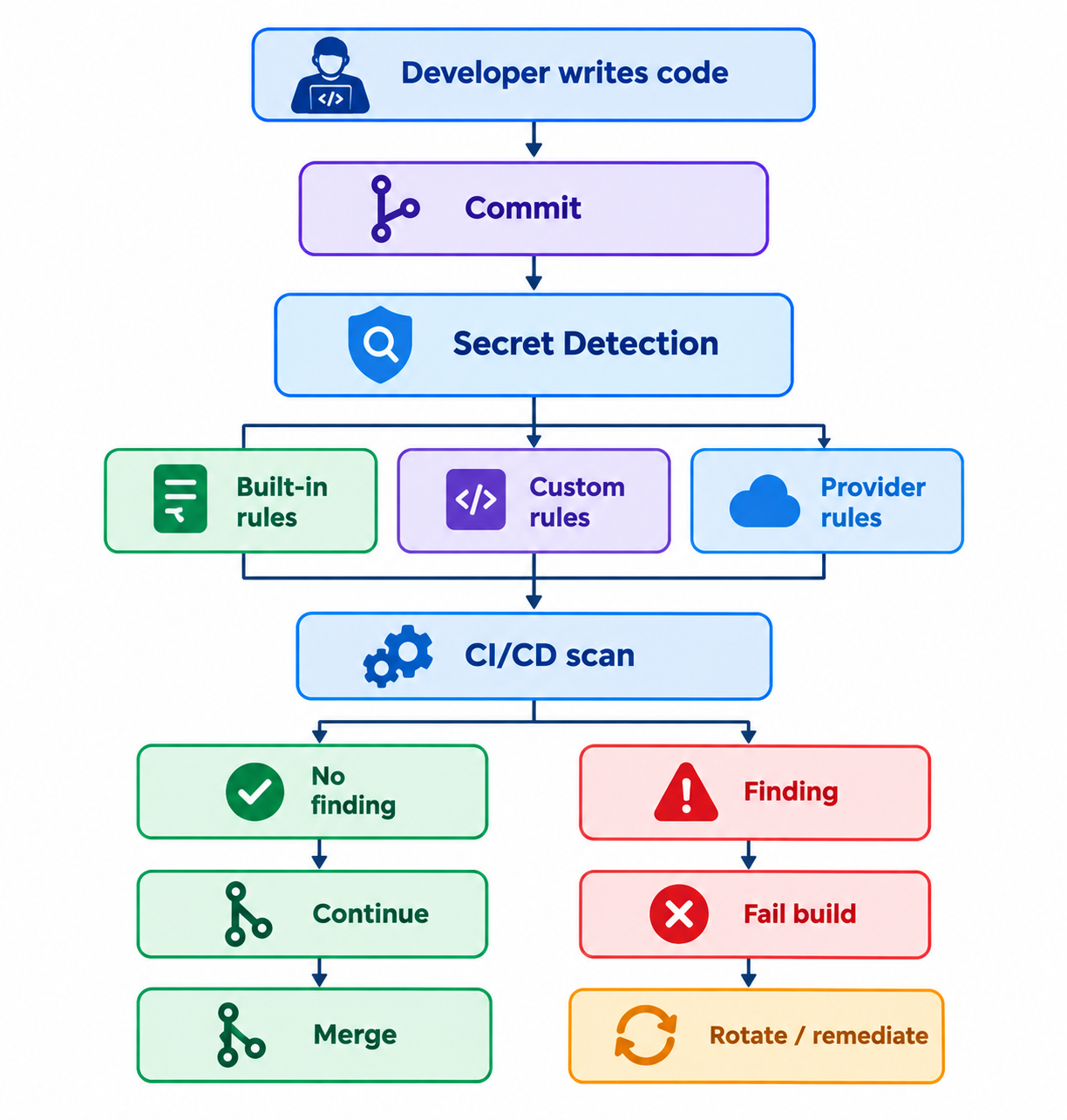
This layered approach is more robust than depending on a single regular expression or a single scanner.
Final Thoughts
Secret detection should be treated as a preventive security control, not simply a tool that searches Git repositories.
The most effective strategy combines:
- Standard secret-detection signatures
- Organization-specific custom rules
- Detection across application and infrastructure code
- CI/CD enforcement
- False-positive management
- Credential rotation and incident response
The key idea is simple:
Detect secrets as early as possible, ideally before they become part of the production software supply chain.
Generic scanners provide an excellent foundation, but organizations can improve coverage by understanding how their own developers name, structure, and store sensitive values.
When custom rules are combined with automated CI/CD enforcement, secret detection becomes part of the development process rather than an afterthought.
Custom rules + automated pipeline enforcement = proactive secret protection.