Static Application Security Testing (SAST) is an important part of modern application security. By analyzing source code before an application is deployed, SAST tools can identify potential security vulnerabilities and insecure coding patterns early in the development lifecycle.
Tools such as Semgrep provide a large collection of predefined rules that can detect many common security issues. These rules are a good starting point, but they cannot always understand the security requirements of a specific application, organization, or technology stack.
This is where custom SAST rules become valuable.
In this post, we'll look at how custom Semgrep rules can be used to detect security patterns that aren't identified by the default ruleset. The examples are based on a .NET application using Azure services, but the same concept can be applied to other programming languages and frameworks.
Starting with the Default Rules
The first step was to run Semgrep against the project using the standard rules.
The default rules provide broad coverage for common security vulnerabilities and insecure coding practices. They are useful because we don't need to create rules for every well-known vulnerability ourselves.
However, the scan produced no findings for the security patterns we were interested in.
A clean result can be misleading if we only interpret it as:
"There are no security issues in this project."
A more accurate interpretation is:
"None of the rules that were executed identified a matching pattern."
This distinction is important in SAST.
A scanner can only detect a vulnerability or insecure practice when it has a rule capable of recognizing that particular pattern.
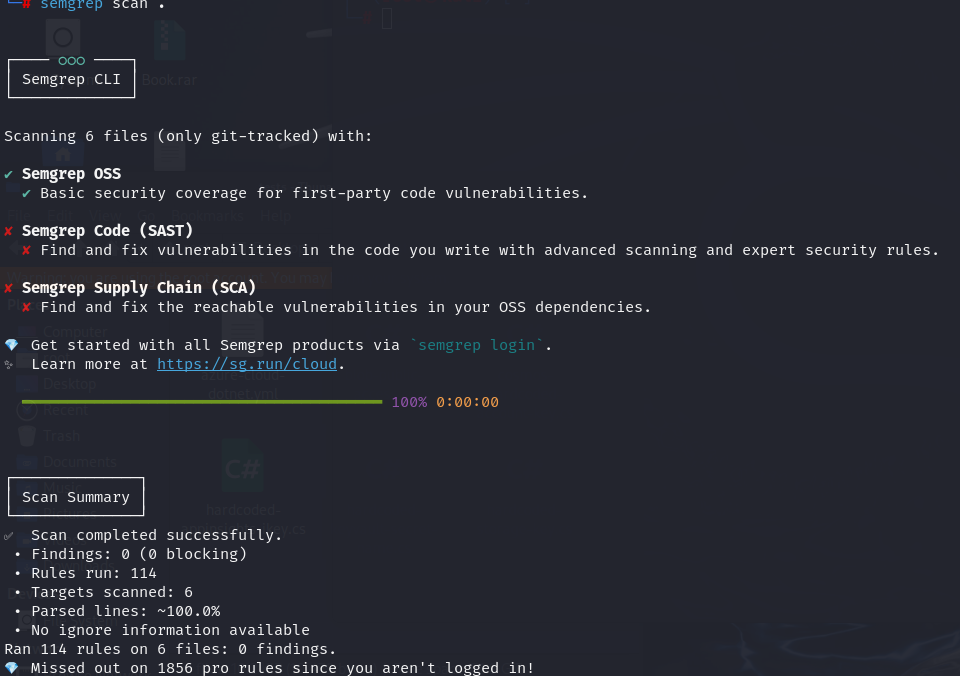
The application still contained patterns that we considered security-sensitive, particularly around the way Azure services were being used.
This led to the next question:
Can we teach Semgrep about security requirements that are specific to our project?
The answer is yes.
Creating a Custom Semgrep Ruleset
Semgrep allows us to create our own rules in addition to the rules provided by the platform.
For this project, we created a custom ruleset focused on Azure and .NET security patterns.
Example Azure-Specific Semgrep Rules:
rules:
  - id: dotnet.azure.blob-public-access
    message: >-
      BlobContainerClient.SetAccessPolicyAsync / CreateIfNotExistsAsync enables
      PublicAccessType.Blob or BlobContainer. Anonymous internet clients can read container
      data (CWE-284). Keep containers private and use SAS or authenticated access instead.
    severity: ERROR
    languages: [csharp]
    metadata:
      category: security
      subcategory: [vuln]
      cwe: "CWE-284: Improper Access Control"
      owasp: "A02:2021 - Cryptographic Failures"
      confidence: HIGH
      likelihood: HIGH
      impact: HIGH
      technology: [csharp, azure, blob-storage]
      references:
        - https://cwe.mitre.org/data/definitions/284.html
        - https://learn.microsoft.com/en-us/azure/storage/blobs/anonymous-read-access-prevent
    patterns:
      - pattern-either:
          - pattern: $C.SetAccessPolicyAsync(PublicAccessType.Blob)
          - pattern: $C.SetAccessPolicyAsync(PublicAccessType.Blob, ...)
          - pattern: $C.SetAccessPolicyAsync(PublicAccessType.BlobContainer)
          - pattern: $C.SetAccessPolicyAsync(PublicAccessType.BlobContainer, ...)
          - pattern: $C.CreateIfNotExistsAsync(PublicAccessType.Blob)
          - pattern: $C.CreateIfNotExistsAsync(PublicAccessType.Blob, ...)
          - pattern: $C.CreateIfNotExistsAsync(PublicAccessType.BlobContainer)
          - pattern: $C.CreateIfNotExistsAsync(PublicAccessType.BlobContainer, ...)
          - pattern: $C.CreateIfNotExists(PublicAccessType.Blob)
          - pattern: $C.CreateIfNotExists(PublicAccessType.Blob, ...)
          - pattern: $C.CreateIfNotExists(PublicAccessType.BlobContainer)
          - pattern: $C.CreateIfNotExists(PublicAccessType.BlobContainer, ...)
          - pattern: $C.SetAccessPolicy(PublicAccessType.Blob, ...)
          - pattern: $C.SetAccessPolicy(PublicAccessType.BlobContainer, ...)
The ruleset can be executed with:
semgrep scan --config ./azure-cloud-dotnet.yml .The scan detected five custom C# rules and produced six findings.
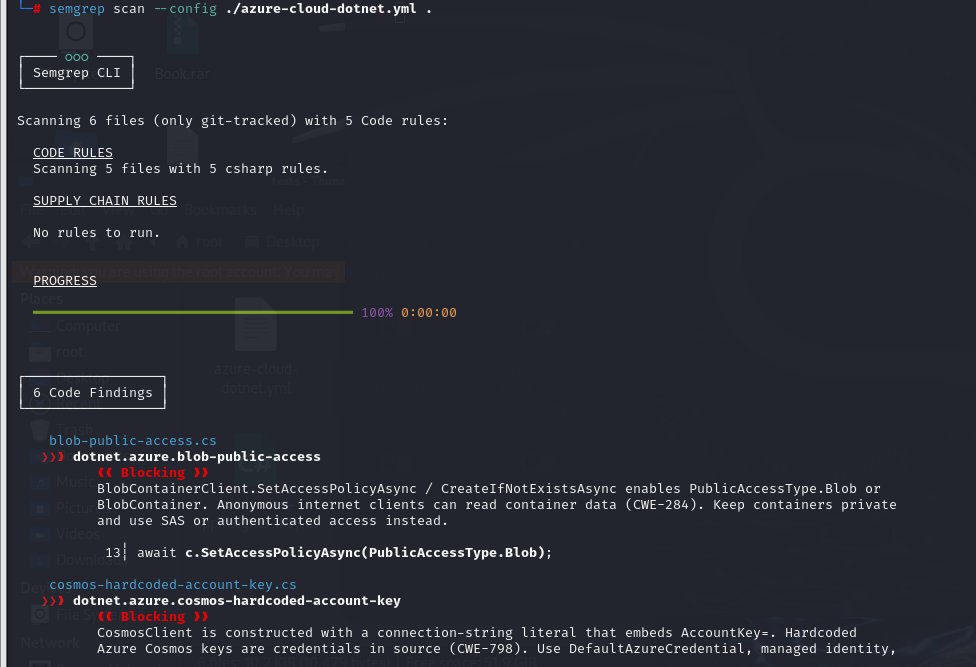
Some of the findings included:
- Public Azure Blob Storage access
- Hardcoded Azure Cosmos DB account keys
- Hardcoded Application Insights instrumentation keys
- Hardcoded Key Vault secret identifiers
This is where the difference between a generic SAST ruleset and a project-specific ruleset becomes clear.
Example: Detecting Public Blob Access
One of the custom rules identifies potentially dangerous Azure Blob Storage configurations.
The scan detected code similar to:
await c.SetAccessPolicyAsync(PublicAccessType.Blob);The custom rule reports this because allowing public Blob access can make container data readable by anonymous internet clients.
The finding provides additional context, including the reason the pattern is considered dangerous and the recommended alternative.
This is a good example of a rule that is closely connected to the application's cloud environment.
Rather than simply detecting a generic insecure function, the rule understands a security-sensitive Azure API and the way it is being used.
Example: Detecting Hardcoded Cosmos DB Credentials
Another custom rule detects Azure Cosmos DB connection strings containing an account key.
For example:
_ = new CosmosClient("AccountEndpoint=https://x.documents.azure.com:443/;AccountKey=AbCdEfGhIjKlMnOpQrStUvWxYz0123456789+/==;");The rule identifies the embedded AccountKey and reports it as a hardcoded credential.
Instead of keeping credentials directly in source code, the application can use mechanisms such as managed identity, DefaultAzureCredential, environment-based configuration, or a secret-management service such as Azure Key Vault.
Again, the value of the custom rule is that it captures a security requirement specific to the technologies used by the application.
Example: Application Insights Keys
The custom ruleset can also identify hardcoded Application Insights instrumentation keys.
For example:
TelemetryConfiguration.Active.InstrumentationKey = "aaaaaaaa-bbbb-cccc-dddd-eeeeeeeeeeee";
Although this is not necessarily the same type of credential as a database password, allowing sensitive configuration values to become embedded in source code can create security and operational problems.
A custom SAST rule allows the organization to define how these values should be handled and automatically detect violations during development.
Example: Key Vault Secret Names
The ruleset also identifies hardcoded Key Vault secret identifiers, such as:
await client.GetSecretAsync("ApiKey");The reasoning here is different from simply searching for a secret value.
The application may already be using DefaultAzureCredential correctly, but the organization may still want secret names and other configuration details to come from configuration rather than being hardcoded.
This demonstrates an important characteristic of custom SAST rules:
They don't have to detect only traditional vulnerabilities.
They can also enforce security policies, architectural decisions, and organizational coding standards.
The Difference Is Context
The important difference between default and custom rules is not that one is "good" and the other is "bad."
Default rules provide broad, reusable security coverage.
Custom rules provide context-specific security coverage.
For example:
|
Security requirement |
Default rules |
Custom rules |
|
Common security
vulnerabilities |
✔️ |
✔️ |
|
Generic insecure coding
patterns |
✔️ |
✔️ |
|
Organization-specific
policies |
Limited |
✔️ |
|
Azure-specific
application requirements |
Limited |
✔️ |
|
Internal APIs and
libraries |
Limited |
✔️ |
|
Project-specific coding
patterns |
Limited |
✔️ |
|
Custom severity and
remediation guidance |
Limited |
✔️ |
The best approach is therefore not to replace the default rules.
It is to extend them.
Custom Rules Are Not Limited to C#
Although this example focuses on C# and Azure, custom Semgrep rules are not limited to one programming language.
Rules can be created for different languages and technology stacks, including languages such as:
- C#
- Java
- JavaScript
- TypeScript
- Python
- Go
- PHP
- Ruby
- Kotlin
- Rust
- and others supported by Semgrep
This makes the approach useful for organizations with multiple development teams and different technology stacks.
For example, an organization could create custom rules for:
Python
Detect unsafe use of internal database APIs
Java
Prevent usage of a deprecated authentication library
JavaScript / TypeScript
Detect insecure DOM APIs or prohibited internal APIs
C#
Detect insecure Azure SDK configurations
Go
Detect insecure TLS or HTTP client configurations
The exact rule syntax and analysis capabilities depend on the language and the type of pattern being detected, but the underlying concept remains the same:
turn security knowledge into an automated code check.
Custom Rules Can Encode Organizational Knowledge
This is perhaps the most important benefit of a custom ruleset.
Security knowledge often exists outside traditional vulnerability databases.
For example, an organization might have a rule saying:
"Developers must not call this internal API directly."
Or:
"All database connections must use our approved authentication mechanism."
Or:
"Azure resources must not be configured for anonymous access."
Or:
"This deprecated library must not be introduced into new services."
These may not be vulnerabilities that a generic SAST tool can universally identify.
But they are still important security requirements for that organization.
A custom rule allows those requirements to become executable.
Instead of relying on code reviews or documentation to enforce the policy, the SAST pipeline can automatically identify violations.
Integrating Custom Rules into CI/CD
Once the rules are created, they can be stored alongside the application's security configuration and executed as part of the development pipeline.
For example:
Developer creates code –> Pull Request –> Semgrep scan –> Default security rules + Custom organization rules –> Findings –> Developer fixes the issue –> Code review / merge
This means the custom rules don't have to be used only during an occasional security assessment.
They can become part of the normal software development lifecycle.
The rules can also be maintained in version control, reviewed through pull requests, and updated as the application's architecture and security requirements evolve.
Don't Create a Rule for Everything
Custom rules are powerful, but that doesn't mean every coding preference needs to become a SAST rule.
A useful custom rule should have a clear purpose.
Before creating one, ask:
- Is this pattern actually a security concern?
- Can the pattern be detected reliably?
- Will the rule generate too many false positives?
- Is the remediation clear to developers?
- Should violating the rule block the CI/CD pipeline?
- Does the rule apply to the entire organization or only to one project?
Poorly designed rules can create alert fatigue.
The goal isn't to produce the maximum number of findings.
The goal is to produce useful findings that developers can act on.
Default Rules + Custom Rules
The real strength comes from combining both approaches.
Default rules give us a broad security baseline for common vulnerabilities.
Custom rules allow us to add security knowledge specific to our applications, infrastructure, organization, and development practices.
In our example, the default scan produced no relevant findings, while the custom Azure/.NET rules identified six.
That doesn't mean the custom rules are universally better than the default rules.
It demonstrates something more important:
SAST effectiveness depends not only on the scanning engine, but also on whether the rules understand what is considered insecure in the environment being scanned.
Conclusion
Default SAST rules are an excellent starting point, but they cannot capture every security requirement of every application.
Every organization has its own architecture, cloud services, libraries, coding practices, and security policies. These requirements can be difficult for a generic ruleset to understand.
Custom Semgrep rules provide a way to bridge that gap.
By creating rules for project-specific patterns, teams can extend their SAST coverage and turn internal security knowledge into automated checks.
And because the approach can be applied across multiple programming languages, the same idea can be extended from a single C#/.NET project to a broader multi-language development environment.
The result is a more tailored security process:
Default rules provide the baseline.
Custom rules provide the context.
Together, they provide stronger and more relevant SAST coverage.